
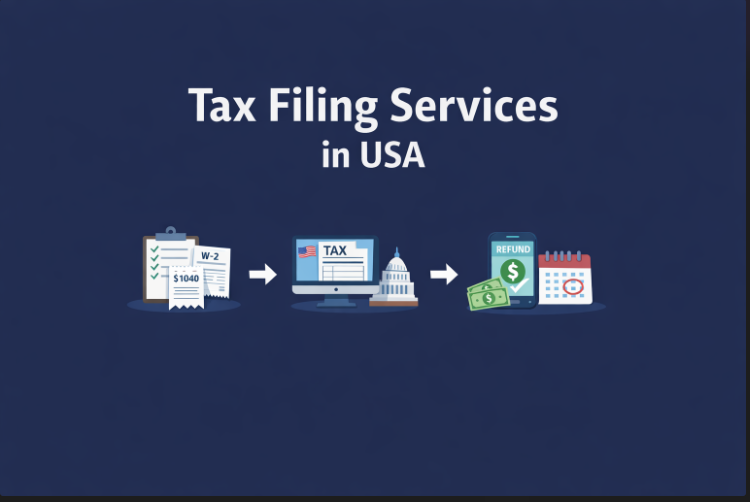
Tax Filing Services in USA
Accurately filing your taxes is one of the most important financial responsibilities for anyone in the USA whether you’re an individual, freelancer, or business owner. The right tax filing service can not only save you valuable time but also minimize errors, ensure compliance, and even help you maximize your refund.
In this comprehensive guide, we’ll walk you through every type of tax filing service available, the step-by-step process, and expert tips to make your tax filing experience smooth, stress-free, and completely worry free.
Types of Tax Filing Services in the USA
When it comes to filing taxes, there are several options available to suit different needs, budgets, and levels of expertise. Understanding the differences between these services can help you choose the one that’s right for you.
1. Online Tax Filing Platforms
Online platforms like TurboTax, H&R Block, and TaxAct, Taxtallypro have revolutionized tax filing by making it quick, convenient, and accessible from anywhere. These platforms are designed to guide you through the entire process with minimal stress. Key features often include:
-
Step-by-step guidance through all necessary forms such as W-2, 1099, and 1040.
-
Built-in calculations and error checks to minimize mistakes.
-
Federal and state filing options from a single dashboard.
-
Customer support via chat, phone, or live help for more complicated tax situations.
Pros:
-
Fast and convenient, with minimal paperwork
-
Cost-effective compared to hiring a professional
-
Suitable for individuals with simple to moderately complex tax returns
Cons:
-
Limited personalized guidance for complex tax scenarios
-
May not provide comprehensive audit support
-
Requires careful input to avoid mistakes
2. In-Person Tax Professionals
For those with more complex tax situations, hiring a Certified Public Accountant (CPA), Enrolled Agent, or Tax Consultant can provide peace of mind and expert guidance. These professionals are especially valuable for:
-
Businesses with multiple revenue streams or complicated deductions
-
Self-employed individuals or freelancers managing various forms of income
-
Taxpayers facing audits or previous filing errors
Pros:
-
Personalized advice tailored to your unique financial situation
-
Expert audit support and guidance on deductions
-
Helps ensure maximum tax savings while remaining compliant
Cons:
-
Higher cost compared to online platforms
-
Requires appointments and time investment
-
Services may vary depending on the professional’s expertise
3. DIY Tax Filing vs. Professional Help
Choosing between doing it yourself and hiring a professional depends on your tax complexity, comfort level, and budget:
-
DIY Tax Software:
-
Ideal for simple returns with straightforward income sources
-
Affordable and accessible anytime
-
Requires careful attention to avoid errors
-
-
Professional Tax Help:
-
Best for complex tax returns or maximizing deductions
-
Provides guidance on tax planning, audits, and special credits
-
Higher cost but often worth it for peace of mind
-
Tip: Many taxpayers combine both approaches—using online software for straightforward filings and consulting a professional for complex matters, like business income or large investments.
Step-by-Step Tax Filing Process
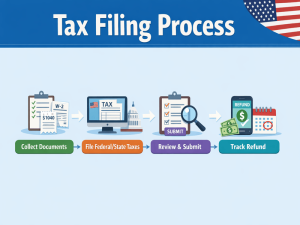
Filing taxes in the USA can seem daunting, but breaking it down into clear steps makes the process manageable. Whether you’re using online software or working with a professional, following these steps ensures accuracy, compliance, and peace of mind.
1. Collect All Required Documents
The first and most important step in filing taxes is gathering all the necessary documents. Having everything organized upfront makes the process smoother and reduces the chances of errors. Key documents include:
-
W-2 Forms – Provided by your employer, these show your total wages and taxes withheld.
-
1099 Forms – For freelance work, contract jobs, or investment income.
-
1040 & Schedule C – Required for reporting business income and expenses.
-
Receipts and Records for Deductions and Credits – Such as charitable donations, medical expenses, or education-related deductions.
-
Other Supporting Documents – Mortgage interest statements, student loan interest forms, or childcare expenses.
Pro Tip: Keep both digital and physical copies of all documents. Many online platforms allow you to upload scans for faster filing.
2. File Federal and State Taxes
Once all documents are ready, the next step is filing your taxes. In the USA, you typically need to file both federal taxes with the IRS and state taxes (if your state has income tax).
-
Federal Filing: Use Form 1040 and any relevant schedules depending on your income type.
-
State Filing: Each state has its own requirements, forms, and deadlines. Some online platforms handle both federal and state filings in one process.
-
Professional Help: CPAs and tax consultants can ensure your forms are accurate and complete, reducing the risk of audits or penalties.
Tip: Filing electronically is faster and often more accurate than paper filing. Direct deposit for refunds also speeds up the process.
3. Be Mindful of Deadlines
Missing tax deadlines can result in fines, interest charges, or delayed refunds. Keep the following dates in mind:
-
Tax Day: Typically April 15 each year (unless extended due to weekends or holidays).
-
Extension Filing: You can request an extension if you need more time, but any taxes owed must still be paid by the original deadline.
Pro Tip: Set reminders well in advance. Filing early can also help you identify missing documents or deductions in time.
Extra Tips for a Smooth Process
-
Double-check your personal information, Social Security numbers, and bank details for refunds.
-
Review all forms carefully to ensure deductions and credits are correctly applied.
-
Keep copies of your filed return for at least three years in case of IRS inquiries or audits.
Choosing the Right Tax Filing Service
Selecting the right tax filing service is one of the most important decisions you can make when preparing your taxes. The right choice can save you time, minimize errors, and even help maximize your refund. Here are key factors to consider when deciding between online platforms and professional services:
1. Cost vs. Services
When evaluating tax services, consider both the price and what is included:
-
Online Platforms: Generally more affordable, with tiered pricing based on features such as federal and state filing, deduction guidance, or audit support.
-
Professional Services: Higher costs, but they often provide personalized advice, in-depth tax planning, and audit protection.
Tip: Choose a service that aligns with the complexity of your tax situation. Simple returns may not require a professional, while complex business or investment income often does.
2. Support Options
Tax questions or issues can arise at any stage. Look for services that offer reliable support:
-
Live chat, phone, or email support for real-time assistance
-
Audit assistance or representation in case of IRS inquiries
-
Access to tax professionals for clarification on deductions or credits
Tip: A platform with strong support can save you stress, especially if this is your first time filing or you have a complicated tax situation.
3. Software Features
If you opt for an online platform, make sure the software offers features that simplify your filing process:
-
Auto-calculation of taxes and deductions to minimize errors
-
Guided steps and prompts for each form (W-2, 1099, 1040, etc.)
-
Integration with financial accounts to import income and expenses
-
Mobile-friendly interfaces for filing on the go
Tip: Features like “deduction maximizers” or “audit risk checks” can help you get the maximum refund while staying compliant.
4. Reviews & Ratings
Before committing, research how others have rated the service:
-
Customer reviews for reliability, ease of use, and accuracy
-
Independent comparisons of pricing, features, and support
-
Trust indicators like certifications, endorsements, or years of experience
Tip: Combining user reviews with expert evaluations gives a balanced view of what to expect from a service.
Pro Recommendation:
For many taxpayers, a hybrid approach works best—using online software for simple filings while consulting a professional for complex situations, audits, or maximizing deductions.
Common Mistakes to Avoid and Expert Tips
Filing taxes can be stressful, and even small mistakes can lead to penalties, delayed refunds, or missed opportunities for deductions. Understanding the most common errors and following practical tips can make your tax filing process smoother and more accurate.
Common Mistakes to Avoid
-
Missing Deductions or Tax Credits
Many taxpayers fail to claim all eligible deductions or credits, which can reduce their refund. Examples include education credits, charitable contributions, or business expenses for freelancers. -
Filing Forms Incorrectly
Errors in forms—like incorrect Social Security numbers, wrong income amounts, or misplaced signatures—can trigger audits or require amended filings. -
Submitting Late or Incomplete Filings
Missing deadlines or submitting incomplete forms can result in penalties and interest charges. Even if you owe nothing, late filing can create unnecessary complications.
Expert Tips for Accurate Filing
-
Use a Checklist for Required Documents: Organize all W-2s, 1099s, receipts, and records of deductions before you start filing. This reduces errors and saves time.
-
Double-Check Personal Information: Ensure your name, Social Security number, and bank details for refunds are accurate. Even small mistakes can delay processing.
-
Consider Professional Help for Complex Situations: If you have business income, investments, multiple income sources, or face an audit, consulting a CPA or tax professional can save money and prevent mistakes.
-
Start Early: Don’t wait until the last minute. Early filing allows time to gather missing documents, correct mistakes, and maximize your refund.
-
Keep Records: Store both digital and physical copies of your tax filings and supporting documents for at least three years in case of IRS questions or audits.
Pro Tip: Combining careful organization, double-checking information, and professional advice for complex filings can help you avoid common pitfalls and ensure a smooth tax season.
Popular Tax Filing Software and Services
Choosing the right tax filing software or service can make a huge difference in how smoothly your taxes are completed. Here’s a detailed look at some of the most trusted options in the USA, along with their best use cases and key features:
| Service | Best For | Key Features |
|---|---|---|
| TurboTax | Individuals & Small Businesses | – Step-by-step guidance for all tax forms (W-2, 1099, 1040) – Deduction and credit maximizer to help increase refunds – Easy import of previous tax returns and financial data – Live CPA or EA support available |
| H&R Block | All Tax Situations | – Offers both online and in-person filing options – Audit support and representation for IRS inquiries – User-friendly interface with guidance for complex filings – Extensive help articles and chat support for questions |
| TaxAct | Budget-Conscious Filers | – Affordable pricing with federal and state filing included – Step-by-step guidance for simple to moderately complex returns – Import previous tax returns for ease of use – Accuracy guarantee and audit support available |
How to Choose the Right Software for You
-
Simple Returns: TurboTax and TaxAct are excellent choices for individuals with straightforward income and deductions.
-
Complex Tax Situations: H&R Block is ideal for taxpayers needing audit support, business deductions, or in-person guidance.
-
Budget-Friendly Filing: TaxAct provides robust features at a lower cost, making it a great choice for cost-conscious filers.
Pro Tip: Many taxpayers use a hybrid approach—starting with online software for basic filings and consulting a professional or H&R Block for complicated deductions, business income, or audit risk.
Tips for First-Time Tax Filers
State-Specific Filing Tips
Note: The following tips are tailored for major states. Be sure to check your state’s official tax portal for the most up-to-date information.
California
-
Unique Filing Rules: California offers different credits and deductions, such as the Standard Deduction Credit.
-
Deadline: April 15th (unless extended).
-
Required Forms: Form 540, Schedule CA.
Texas
-
Unique Filing Rules: No state income tax, but self-employment taxes may apply for businesses.
-
Deadline: April 15th.
-
Required Forms: Form 1040 (Federal), no state forms required.
New York
-
Unique Filing Rules: New York allows deductions for local property taxes and offers various credits for renters.
-
Deadline: April 15th.
-
Required Forms: Form IT-201, Schedule A.
Filing taxes for the first time can feel overwhelming, but with careful planning and preparation, the process can be smooth and stress-free. Here are some essential tips to help first-time filers navigate tax season confidently:
1. Start Early
Don’t wait until the last minute to begin your tax filing. Starting early gives you enough time to:
-
Gather all necessary documents (W-2s, 1099s, receipts)
-
Identify any missing information
-
Avoid rushed decisions or mistakes
Pro Tip: Early filing can also speed up your refund, especially if you’re expecting a direct deposit.
2. Understand What Documents Are Required
Before you start filing, make sure you know which documents you need. Common documents include:
-
W-2 Forms for wages
-
1099 Forms for freelance, investment, or side income
-
Receipts or records for deductible expenses like charitable donations or education costs
-
Other supporting forms depending on your situation (e.g., student loan interest statements, mortgage interest)
Keeping everything organized will make the filing process faster and reduce the risk of errors.
3. Consider Free Filing Programs
If your income falls below a certain threshold, you may qualify for free federal tax filing programs offered by the IRS or trusted online platforms like TurboTax Free Edition or H&R Block Free Online. These programs provide step-by-step guidance and are ideal for first-time filers with simple tax situations.
4. Keep Copies of Your Tax Returns
Always save both digital and physical copies of your tax filings and supporting documents. Keeping records helps you:
-
Verify information in case of an IRS audit
-
Track deductions and credits for future years
-
Simplify filing next year
Extra Tips for Confidence
-
Use online tools or checklists to ensure nothing is missed
-
Ask for help from a professional if your situation is complicated
-
Double-check personal information like Social Security numbers and bank details
Pro Tip: Taking a systematic approach—preparing documents, starting early, and using reliable software can make your first tax filing experience smooth and worry-free.
Conclusion
Filing taxes in the USA doesn’t have to be stressful or confusing. By choosing the right tax filing service whether it’s a reliable DIY software like TurboTax or TaxAct, or a trusted professional service such as a CPA or H&R Block—you can ensure accuracy, compliance, and peace of mind. Staying organized, meeting deadlines, and taking advantage of expert guidance can help you maximize your refund while minimizing errors.
Call For Further info: Take control of your taxes today consider hiring a professional for complex situations, explore trusted online tax software for simple filings, and always stay informed about deadlines. A well-prepared tax filing journey starts with the right strategy and the right tools.